Actions (tag actions)
- Action Types
- Using Custom Action Classes
- Action Attributes
- Grouped Actions
- Conditional Actions
- Example Actions
In DGS, the <actions> tag is used to define a set of operations that users can perform on table data. These actions include creating, editing, removing, viewing, importing, exporting, and customizing data interactions.
Actions determine how user controls (buttons, links, menus) are displayed in the interface and how they behave when triggered. You can configure both single-record actions (like edit or remove) and bulk actions (like bulk delete or export), and customize their appearance, permissions, behavior, and integration with JavaScript or backend logic.
This documentation explains the types of actions available, how to configure them, and how to integrate them into your DGS tables effectively.
To add some action to you DGS use actions tag.
<table>
    <actions>
        ...put your actions here...
    </actions>
</table>
Actions Tag Attributes
mode
It Affects how actions are displayed when there are multiple. Can be buttons or list.
If set to buttons, actions will not be grouped in a dropdown.
Default is list:
<actions mode="buttons">
    <action type="list" caption="<?php echo __('Data')?>" />
</actions>
Action Types
Store::ACTION_LISTStore::ACTION_INSERTStore::ACTION_EDITStore::ACTION_REMOVEStore::ACTION_INFOStore::ACTION_PARENTStore::ACTION_CHILDStore::ACTION_DOWNLOADStore::ACTION_CSVStore::ACTION_CSV_IMPORTStore::ACTION_BATCH_INSERTStore::ACTION_COLUMNSStore::ACTION_PLUGIN
Action type list (Store::ACTION_LIST)
This action is responsible for displaying a data list.
<action type="list"
        caption="<?php echo __('Deals'); ?>"
        isLoadAllColumns="true" />
Action Specific Attributes:
isLoadAllColumns- iftrue, all column data will be loaded, including hidden ones, but only visible ones will be displayed in the list.
Action type insert (Store::ACTION_INSERT) / edit (Store::ACTION_EDIT)
Adding/editing data.
<action type="insert"
        caption="<?php echo __('Add'); ?>"/>
<action type="edit"
        caption="<?php echo __('Edit '); ?>"/>
Action type remove (ACTION_REMOVE)
Remove data.
<action type="remove"
        caption="<?php echo __('Remove'); ?>"/>
The remove action can now include one or more child actions using <item> tags. These child actions provide custom behavior in the confirmation dialog, such as alternative removal strategies or redirection.
This is useful when the user should select a specific removal method (e.g., soft delete, archive, or redirect).
<action type="remove"
        caption="<?php echo __('Remove'); ?>"
        dialogMessage="<?php echo __('How would you like to proceed?'); ?>"
        dialogConfirmButtonCaption="<?php echo __('Yes, remove'); ?>"
        dialogCancelButtonCaption="<?php echo __('Cancel'); ?>">

    <item id="archive"
          caption="<?php echo __('Archive Instead'); ?>"
          js="archiveItem(%id%)"
          css="btn btn-warning" />

    <item id="delete"
          caption="<?php echo __('Delete Permanently'); ?>"
          link="<?php echo $core->getUrl('/delete/permanent/'); ?>"
          css="btn btn-danger" />
</action>
Action Specific Attributes:
dialogMessage– message shown in the dialog.dialogConfirmButtonCaption– (optional) text for the confirmation button. Defaults to "Yes".dialogCancelButtonCaption– (optional) text for the cancel button. Defaults to "No".
Action type info (ACTION_INFO)
Show readonly data.
<action type="info"
        caption="<?php echo __('Details'); ?>"/>
Action type parent (ACTION_PARENT)
Action type child (ACTION_CHILD)
Action type download (ACTION_DOWNLOAD)
Action type CSV (Store::ACTION_CSV)
Export data to CSV.
<action type="<?php echo Store::ACTION_CSV; ?>"
        mode="new"
        view="top"
        isLoadAllColumns="false"
        caption="<?php echo __('Export')?>"
        fileName="quotation_details" />
Action Specific Attributes:
isLoadAllColumns- iffalse, only visible data will be exported (by default, all columns are exported).
Action type CSV Import (Store::ACTION_CSV_IMPORT)
Import data from CSV into storage.
<action type="<?php echo Store::ACTION_CSV_IMPORT; ?>"
        view="top"
        caption="<?php echo __('Import')?>"
        button="<?php echo __('Import');?>"
        delimiter=";"
        isFirstRowHeader="true"
        primaryKey="id"
        uploadDirPath="<?php echo FS_RESOURCES_ROOT;?>import/"/>
Action Specific Attributes:
delimiter- CSV file delimiter. Allowed values:,(comma),;(semicolon),\t(tab),|(pipe). Default is,(comma). The delimiter is automatically validated, and if incorrect, a helpful error message will suggest alternative delimiters.isFirstRowHeader- iftrue, the first row is treated as column headers. When enabled, the system validates that all required fields are present in the header row. If any required columns are missing, an error will be thrown listing the missing columns.primaryKey- field name used to match existing records for updating. If a record with the same primary key value exists, it will be updated; otherwise, a new record will be inserted. If not specified, all rows will be inserted as new records.uploadDirPath- directory path for uploaded CSV files. If not specified, the default upload directory from the store will be used.
CSV File Format:
When isFirstRowHeader="true", the CSV file must include a header row with column names that match the field names in the store. The header row should contain all required fields.
Example CSV format with header row:
id,name,email,status
1,John Doe,john@example.com,active
2,Jane Smith,jane@example.com,active
Important notes:
* Column names in the header row must exactly match the field names defined in the store (case-sensitive)
* All required fields must be present in the header row
* Required fields must have non-empty values in each data row
* The delimiter used in the file must match the delimiter attribute value
Validation:
- Delimiter validation: The system automatically detects if the specified delimiter is incorrect by checking if the CSV file appears to have only one column or if header columns don't match known fields. In such cases, an error message will suggest trying alternative delimiters.
- Required fields validation:
- When
isFirstRowHeader="true", the system validates that all required fields are present in the CSV header row. Missing required columns will cause an error. - For each data row, the system validates that all required fields have non-empty values. Missing or empty required field values will cause an error indicating the row number and missing fields.
Action type batchInsert (Store::ACTION_BATCH_INSERT)
Mass addition of fields, used with mode="api".
<table name="settings"
       charset="UTF-8"
       primaryKey="id"
       mode="api">
    <fields>
        <field  type="text"
                caption="<?php echo __('Name'); ?>"
                name="name"
                width="30%"
                required="true" />
    </fields>
    <action type="batchInsert" caption="<?php echo __('Insert')?>" />
</table>
Example JSON string for adding fields:
[
    { "name": "some name" },
    { "name": "some name2" }
]
Action type columns Store::ACTION_COLUMNS
Manage DGS columns displaying and ordering. This data stores to session.
<action type="<?php echo Store::ACTION_COLUMNS; ?>"
        caption="<?php echo __('Columns'); ?>" />
Action type plugin (Store::ACTION_PLUGIN)
Executes a method in a specified plugin instance when the action is triggered.
<action type="<?php echo Store::ACTION_PLUGIN; ?>"
        caption="<?php echo __('Process Data'); ?>"
        plugin="MyPlugin"
        method="onProcessData"
        execute="true" />
Action Specific Attributes:
plugin- (required) The name of the plugin to instantiatemethod- (required) The method to call in the pluginexecute- When set totrue, the action will be executed immediately in aStageBuilderblock context without requiring a request. This is checked by theStageBuilder's_isExecBlockRequestmethod.
Using Custom Action Classes
How to use custom actions in DGS
You can create custom action classes (extending AbstractAction) to implement specialized behavior beyond standard DGS actions. To use a custom action in your DGS, pass the class name as the type attribute:
<actions>
    <action type="list"
            caption="<?php echo __('Contacts'); ?>" />

    <action type="<?php echo NameClass::class; ?>"
            caption="<?php echo __('Custom Action'); ?>" />

    <action type="insert"
            caption="<?php echo __('Add'); ?>"
            mode="new" />
</actions>
When you specify a class name as the type attribute, Store::createActionInstance() directly instantiates that class instead of looking up a standard action. This allows you to use custom action classes from plugins or other namespaces alongside standard DGS actions.
Custom view for custom actions (IActionViewProvider)
Optionally, your custom action can provide its own view instance for rendering its response. To do this, implement the core\store\view\IActionViewProvider interface on your action class.
Interface: IActionViewProvider
createViewInstance(StoreView $storeView): IActionView— Creates and returns the view instance used to render this action's response.
When the action implements this interface, StoreView calls createViewInstance() directly instead of using the default convention-based view resolution (e.g. {ActionName}Action{Mode}View). The action is responsible for instantiation, which allows injecting dependencies into the view.
Example: an action that uses a custom view:
use core\store\view\IActionViewProvider;
use IActionView;
use StoreView;

class MyCustomAction extends AbstractAction implements IActionViewProvider
{
    public const ACTION_NAME = 'myCustom';

    /**
     * @return string
     */
    public function getActionName(): string
    {
        return static::ACTION_NAME;
    }

    /**
     * @param StoreView $storeView
     * @return IActionView
     */
    public function createViewInstance(StoreView $storeView): IActionView
    {
        return new MyCustomActionView($storeView);
    }
}
Action Attributes
caption
A label for displaying the action in DGS. Used for the action button label in the record list and the add/edit form if the title attribute is not specified.
title
Title in forms.
permission
If you need to limit the display of an action by access section, specify the permission section name.
<action type="csv"
        caption="<?php echo __('Export'); ?>"
        view="top"
        permission="employees_export" />
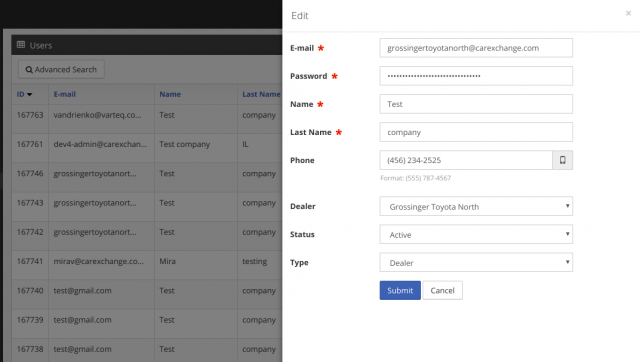
mode
Define how add/edit/info forms are displayed:
mode = "new"Values:
* new - opens in a new page
* right - slides out from the right
* (unspecified) - opens in a modal
Attribute js
For custom action buttons, triggers specified JavaScript function.
$model['actions'] = array(
    'archive' => array(
        'type'    => 'archive',
        'caption' => __('Archive'),
        'js'      => "doArchive(%id%)",
    )
);
Attribute fast
Displays the add form inline in the list without reloading the page. Only for Store::ACTION_INSERT.
fast = "true"You can also set a custom form:
fast = "forms/fast_insert"In this case, template forms/fast_insert.php is used.
Attribute prefill
Pre-fills form with values from the previous entry.
prefill = "true"cancelUrl
Override redirect when pressing Cancel in edit form:
<action type="edit"
        mode="new"
        caption="<?php echo __('Edit')?>"
        title="<?php echo __('Edit Request')?>"
        cancelUrl="<?php echo Core::getInstance()->getUrl('/user/requests/'); ?>" />
redirectUrl
If you need to change the redirect logic after performing the action.
<action type="insert"
        caption="<?php echo __('Add'); ?>"
        redirectUrl="<?php echo Core::getInstance()->getUrl('/company/%s/journal/', $id); ?>" />
button
Text for the button in the action form. Default: Submit.
icon
By default, use save icon for insert and edit actions that include fa-save css class.
labelWidth and fieldWidth
These attributes control grid layout in the form. They are used to set the width of labels and fields in the form. 1 - 12 columns can be specified, where 12 is the full width of the form.
confirmDialog
If a confirmation dialog is needed before performing the action, use the confirmDialog attribute. To set the title and message, use dialogTitle and dialogMessage.
You can also customize the confirm and cancel button captions using the dialogConfirmButtonCaption and dialogCancelButtonCaption attributes.
<action type="archive"
        caption="<?php echo __('Archive'); ?>"
        link="<?php echo Core::getInstance()->getUrl('/deal/archive/%id%/'); ?>"
        confirmDialog="true"
        dialogTitle="<?php echo __('Are you sure?'); ?>"
        dialogMessage="<?php echo __('Do you really want to archive this deal?'); ?>"
        dialogConfirmButtonCaption="<?php echo __('Yes'); ?>"
        dialogCancelButtonCaption="<?php echo __('No'); ?>" />
Attributes:
- dialogTitle – title of the confirmation dialog.
- dialogMessage – message shown in the dialog.
- dialogConfirmButtonCaption – (optional) text for the confirm button. Defaults to "Ok".
- dialogCancelButtonCaption – (optional) text for the cancel button. Defaults to "Cancel".
link
Specify the URL to which a POST request will be sent with record IDs in the grouped_items parameter.
js
Specify the name of the JavaScript function triggered on bulk action.
columns
Used with sectionIdent mode to define number of columns in form (only in mode="new").
Related to (sections)[./FieldsGrouping.ru.md]
<field  type="text"
        name="country"
        hide="true"
        caption="<?php echo __('Country'); ?>"
        sectionIdent="Bank Details"
        sectionCaption="<?php echo __('Bank Details'); ?>"/>
...
<action type="insert"
        mode="new"
        caption="<?php echo __('Add'); ?>"
        columns="2"
        title="<?php echo __('Add New'); ?>" />
css
Custom CSS class for action button styling.
<action type="insert"
            mode="new"
            caption="<?php echo __('Contact Us')?>"
            cancelUrl="false"
            css="leads-btn leads-background-green" />
Grouped Actions
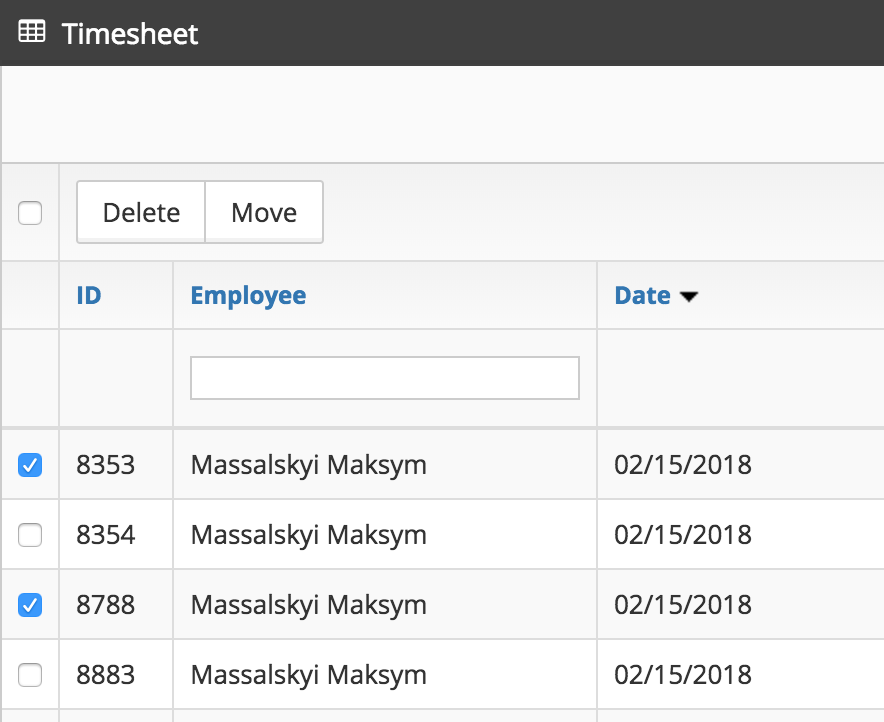
To add bulk actions, use the grouped tag.
<grouped>
    <item caption="<?php echo __('Delete'); ?>"
          type="bulk_delete"
          link="<?php echo $core->getUrl('/test/'); ?>" />

    <item caption="<?php echo __('Move'); ?>"
          type="bulk_move"
          js="js_handler_function_name" />
</grouped>
Attributes:
caption– Label shown on the grouped action button (required)type– Unique identifier for the action logic (required)link– URL to be called for server-side actionjs– JavaScript function to execute on clickconfirmDialog– Enables confirmation dialog if set to "true"dialogTitle– Title shown in the confirmation dialogdialogMessage– Message shown in the confirmation dialogpermission– Restricts action visibility to users with a specific permission section
More examples
<grouped>
    <item caption="<?php echo __('Delete Selected'); ?>"
          type="bulk_delete"
          link="<?php echo $core->getUrl('/items/delete/'); ?>"
          confirmDialog="true"
          dialogTitle="<?php echo __('Confirm Deletion'); ?>"
          dialogMessage="<?php echo __('Are you sure you want to delete selected items?'); ?>" />
</grouped>
<grouped>
<item caption="<?php echo __('Move to Archive'); ?>"
type="bulk_move"
js="moveToArchiveHandler" />
</grouped>
Action Items (Nested Sub-Actions)
In DGS, an <action> tag can include one or more <item> children to define sub-actions.
Each sub-action (defined by an <item>) can have its own caption, JavaScript handler, link, icon, and styling, while still being logically tied to the parent action.
Attributes:
id– Unique identifier of the item (required)caption– Button caption (required)url– Target URL for navigationjs– Name of the JavaScript function to trigger on clickcss– Optional CSS class to style the item (e.g., btn btn-default)icon– Optional icon class (e.g., fa fa-plus)
<action type="info" caption="<?php echo __l('More Options'); ?>" mode="new">
    <item id="details" caption="View Details" url="<?php echo $core->getUrl('/delete/%id%'); ?>" />
    <item id="edit" caption="Edit" js="editItem(%id%)" css="btn btn-default" />
    <item id="delete" caption="Delete" js="deleteItem(%id%)" icon="fa fa-trash" />
</action>
Examples of Different Actions
Adding a top button linking to another URL
<action type="create"
        caption="<?php echo __('Create'); ?>"
        view="top"
        link="<?php echo Core::getInstance()->getUrl('/create/'); ?>"
        mode="new" />
Action linking to a specific URL
<action type="test_task"
        caption="<?php echo __('Test Task')?>"
        link="<?php echo Core::getInstance()->getUrl('/user/review/%id%/task/'); ?>"
        mode="new" />
<action type="remove"
caption="<?php echo __('Delete'); ?>"
confirmDialog="true"
dialogTitle="<?php echo __('Are you sure?'); ?>"
dialogMessage="<?php echo __('This action cannot be undone.'); ?>" />
<action type="external"
caption="<?php echo __('Open Docs'); ?>"
view="top"
mode="new"
link="https://docs.example.com/guide" />
<action type="custom"
caption="<?php echo __('Archive'); ?>"
js="archiveSelectedItems(%id%)"
view="top" />
<action type="insert"
caption="<?php echo __('Add and View Journal'); ?>"
redirectUrl="<?php echo Core::getInstance()->getUrl('/company/%s/journal/', $id); ?>" />Removing Row Actions Based on Conditions
Sometimes different rows need different available actions, depending on record data.
For example, hide delete button if status equals created:
- Subscribe to the
Store::EVENT_ON_LIST_ACTIONSevent:
<listeners>
    <listener event="<?php echo Store::EVENT_ON_LIST_ACTIONS; ?>"
              plugin="Finance"
              method="onListActions" />
</listeners>- Define handler:
/**
 * @event Store::EVENT_ON_LIST_ACTIONS
 * @param FestiEvent $event
 * @return bool
 */
public function onListActions(FestiEvent $event): bool
{
    $status = $event->target['values']['status'];
    if ($status !== 'created') {
        return false;
    }

    $actions = &$event->target['actions'];
    $index = array_search(Store::ACTION_REMOVE, $actions);
    unset($actions[$index]);

    return true;
}